User guide
Settings & languages
Language, what the icon opens, appearance, modules, tags and shortcuts.
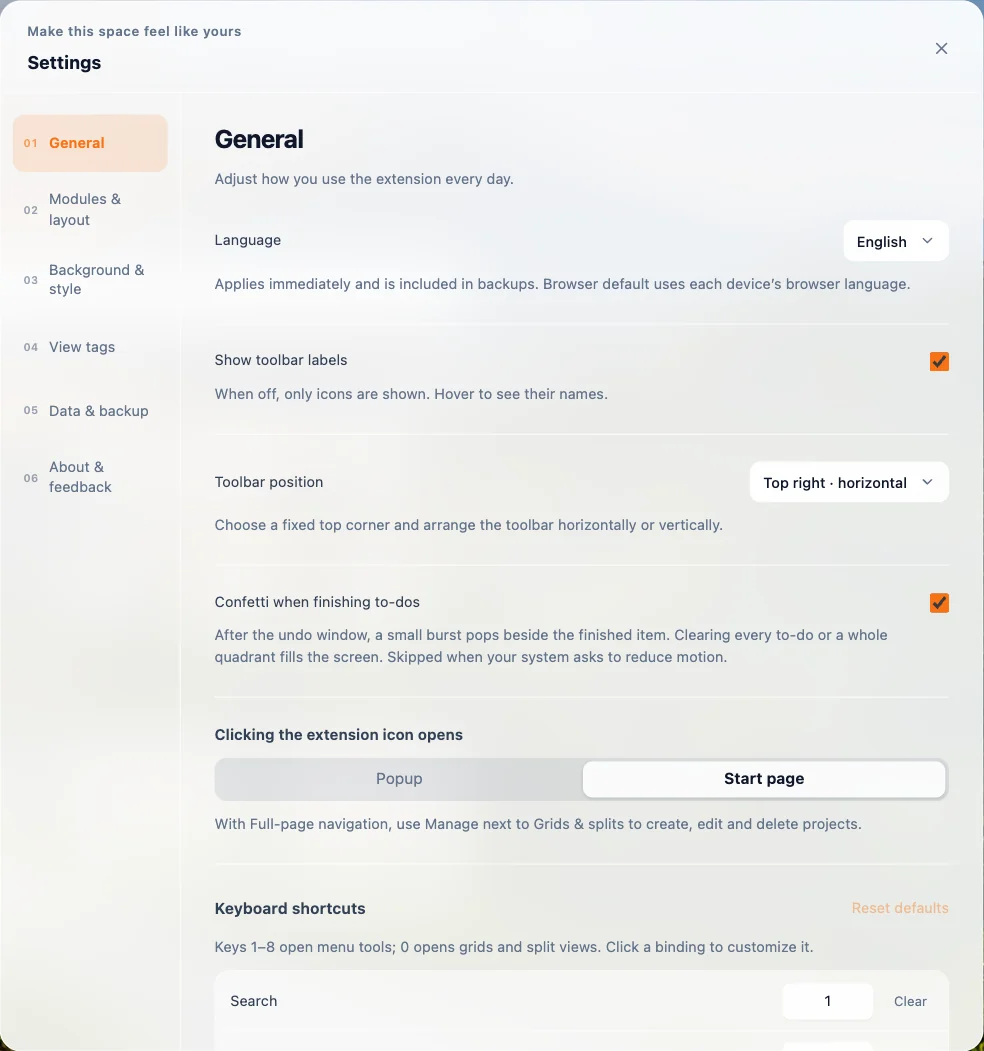
Open settings from the gear at the end of the dashboard toolbar.
- General — choose the language (20 languages, or your browser's default), what clicking the extension icon opens (the full-page Start page or a compact Popup), toolbar labels and position, confetti for finished to-dos, and the dashboard's keyboard shortcuts (see Shortcuts).
- Background & style — scenery, images and dimming. See Backgrounds.
- Modules & layout — content width, and which dashboard sections show and in what order.
- View tags — manage tags for quick links, grids and splits.
- Data & backup — see Backup & restore.
- About & feedback — version, website and support email.
Supported languages: English, Simplified Chinese, Traditional Chinese, Japanese, Korean, Spanish, French, German, Brazilian Portuguese, Italian, Russian, Ukrainian, Polish, Dutch, Turkish, Indonesian, Vietnamese, Thai, Hindi and Arabic.